How to calculate your Big Three
- Enter your birth date. Use the date recorded at your birthplace, even if the date was different elsewhere.
- Enter the local birth time. Use the time as it appeared on the clock. Look for it on a birth record if you can. If you only know the date, select I don’t know my birth time.
- Choose a birth city. Select the matching city and region from the results. The calculator uses the city’s coordinates and the time zone rules for that date. If the city is missing, enter its coordinates and IANA time zone manually.
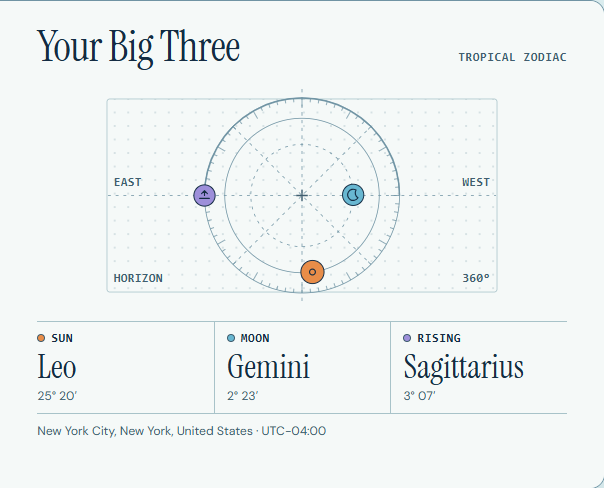
- Calculate your Big Three. Read the Sun, Moon and Rising cards together. With an exact time, each card includes the degree and arcminute within the sign. The plot places the Rising marker on the eastern horizon and shows the Sun and Moon at their relative zodiac angles.
Example birth details and results
Birth date: August 18, 1995
Local birth time: 2:30 PM
Birth city: New York City, New York, United States
This example gives Leo Sun, Gemini Moon, and Sagittarius Rising. The local clock was four hours behind UTC on that date, so the same birth moment was 18:30 UTC. Use Try example to fill in the form and see the placements.
When a birth detail is uncertain
Check the region before selecting a city
If the search offers several places with the same name, check the state or country on the second line. For a birth in Springfield, Illinois, type Springfield Illinois to narrow the list, then select the entry that names Illinois. The time zone shown under the city field is a useful cross-check. Keep the time from the birth record, even if you now live in a different zone.
Check your signs if the birth time is uncertain
Use I don’t know my birth time to see which Sun and Moon signs were possible that day. For help reading two Moon candidates or comparing a range of times, see the guide to checking your Big Three without a birth time.
What your Big Three mean
In Western astrology, your Sun sign is the part of the zodiac that contains the Sun at birth. Astrologers often read it as a theme for identity and motivation. Your Moon sign is based on the Moon’s position at the same moment and is commonly associated with feelings, habits, and what feels familiar.
Your Rising sign, also called your Ascendant, is the part of the zodiac on the eastern horizon at your birthplace when you were born. Astrologers often associate it with first impressions and how you approach unfamiliar situations. The same clock time in two different cities can produce different Rising signs.
Dates, time zones and close calls
The calculator supports birth dates from 1900 through 2099. It uses the time zone rules available in your browser to turn the local time into a single moment. During a fall clock change, a local time like 1:30 AM can occur twice. Choose the occurrence with the correct offset if you know it. During a spring clock change, some clock times never occur. An older record can also use local rules that differ from those in your browser’s historical data.
Placements use the tropical zodiac and geocentric positions for the Sun and Moon. If you get different results elsewhere, read the rising sign calculator troubleshooting guide. A time rounded to the nearest hour can change the Rising sign near a boundary. The Moon can also change signs during the day. When the birth time is unknown, the tool shows the possible Sun and Moon signs for the local date and leaves the Rising sign unavailable.
Astronomical positions use Astronomy Engine. The city catalog is adapted from GeoNames under CC BY 4.0. This tool presents an astrological interpretation framework for personal interest.
Common questions about using a Big Three calculator
Can I use this calculator without an account or email?
Yes. You can calculate your Sun, Moon, and Rising signs in the browser without creating an account or entering an email address. Your birth details stay in this page while you use the calculator; they are not uploaded to an account.
Does it work on an iPhone or Android phone?
Yes. The calculator is designed to run in a mobile browser such as Safari or Chrome. Enter your birth date, choose your birthplace, enter the local birth time, and tap the calculate button. You do not need to download an app.
Should I enter the time from my birth certificate?
Enter the local clock time recorded for the place where you were born. Do not convert it to UTC or to your current time zone. Select the matching city so the calculator can apply its time-zone rules. If the recorded time is approximate, compare the earliest and latest plausible times and treat a changed Rising sign as uncertain.
Why do two calculators give me different Rising signs?
First compare the birth date, local time, birthplace, time-zone handling, and zodiac system. This calculator uses the tropical zodiac. A small time or location difference can move the Ascendant across a sign boundary, so check the input details before deciding that either result is wrong. If you do not know the exact time, neither Rising sign should be treated as certain.